
















2.5-Inch vs 3.5-Inch Drive Trays: 7 Key Differences Explained

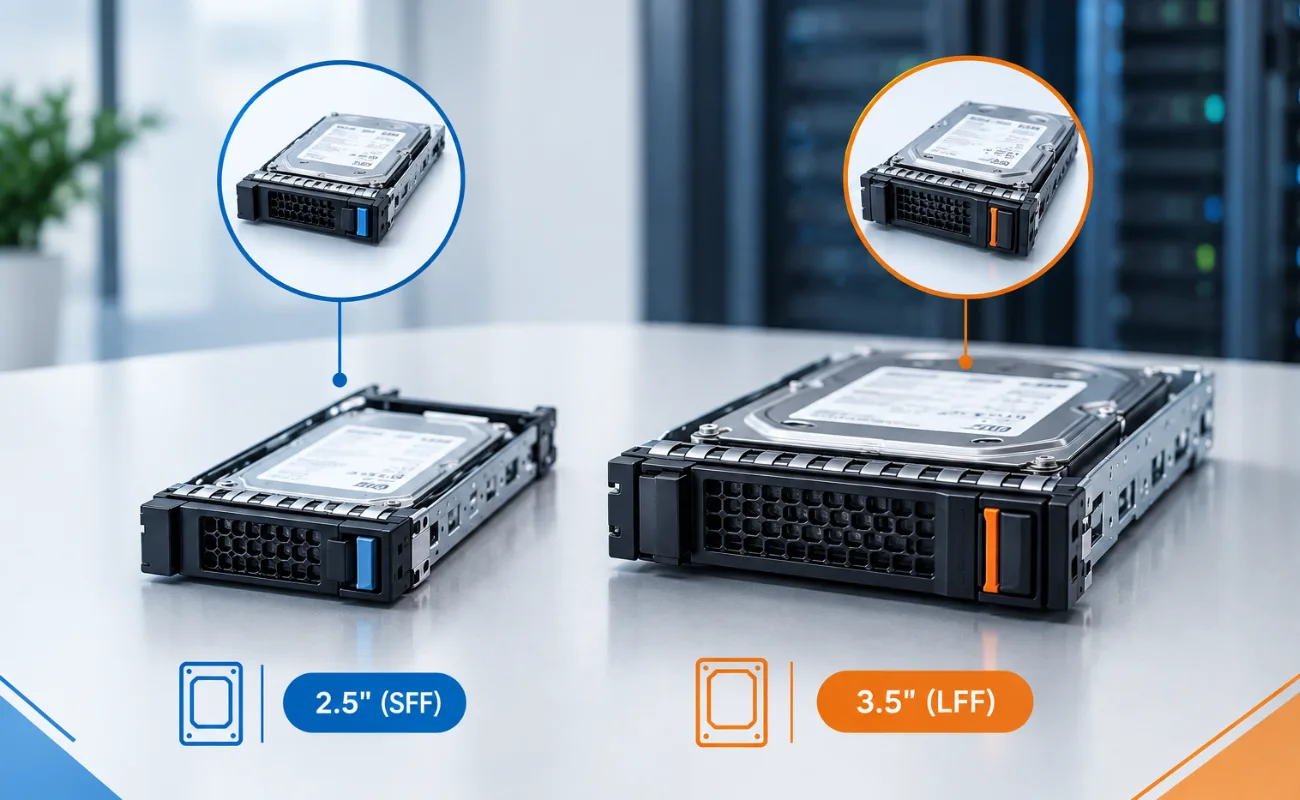
Choosing the right drive tray is an important part of upgrading or maintaining a server. 2.5-inch and 3.5-inch drive trays are designed for different drive sizes, server configurations, and storage requirements.
Understanding the differences can help businesses avoid compatibility problems and choose the right tray for their HDDs, SSDs, and enterprise servers.

1. Physical Size
The most obvious difference between 2.5-inch and 3.5-inch drive trays is their physical size.
2.5-Inch Drive Trays
- Designed for smaller 2.5-inch HDDs and SSDs
- Common in compact server configurations
- Allow more drives to fit into limited space
3.5-Inch Drive Trays
- Designed for larger 3.5-inch drives
- Commonly used with high-capacity enterprise HDDs
- Require more physical space inside the server chassi

The tray size must match the server’s drive bay design and the supported drive format.
2. Drive Compatibility
Compatibility is one of the most important factors when selecting a drive tray.
A 2.5-inch drive tray is generally intended for 2.5-inch drives, while a 3.5-inch drive tray is designed for 3.5-inch drives.
However, compatibility depends on more than physical dimensions. You should also check:
- Server model
- Drive interface
- Mounting-hole configuration
- Hot-swap support
- Drive backplane
- Manufacturer-specific tray design

3. Storage Capacity
Drive size can also influence the storage options available.
3.5-inch enterprise HDDs are widely used when businesses need large amounts of storage capacity at a reasonable cost.
2.5-inch drives, especially SSDs, are often selected when performance, density, and space efficiency are more important.
For example:
| Feature | 2.5-Inch Tray | 3.5-Inch Tray |
|---|---|---|
| Typical drive | 2.5″ HDD/SSD | 3.5″ HDD |
| Physical size | Smaller | Larger |
| Storage density | High drive density | High capacity per drive |
| Common use | Servers, SSD storage | High-capacity HDD storage |
| Space required | Less | More |
4. Server Drive Density
Drive density refers to how many drives can be installed within a specific amount of rack or chassis space.
Servers using 2.5-inch drive trays can often accommodate more drives in the same physical area.
This can be useful for:
- Virtualization
- Databases
- High-performance applications
- SSD storage
- IOPS-intensive workloads
On the other hand, 3.5-inch drive trays are often preferred when individual drive capacity is more important than maximum drive count.
5. Airflow and Cooling
Drive trays also play a role in proper server airflow.
A correctly designed tray helps position the drive securely while maintaining the airflow path through the storage area.
With high-density 2.5-inch configurations, servers may contain a large number of drives in a relatively small space. Proper airflow is therefore important to prevent excessive heat.
For 3.5-inch configurations, the larger drive size requires a different physical arrangement inside the chassis.
Always use the tray specifically designed for the server model to maintain proper installation and cooling.
6. Installation and Maintenance
Both tray types make drive installation and replacement easier, particularly in servers with hot-swap bays.
A properly matched tray can help:
- Secure the drive
- Align it correctly with the backplane
- Simplify replacement
- Support maintenance
- Reduce installation errors
For more information about server drive trays, see our guide: 10 Essential Caddies (Drive Trays) to Upgrade Your Servers.
7. Cost and Use Cases
The cost of a drive tray varies depending on the manufacturer, server model, condition, and compatibility.
2.5-inch trays are commonly used in performance-oriented and high-density server environments, while 3.5-inch trays are popular for large-capacity storage applications.
Choose a 2.5-Inch Tray When:
- You are installing 2.5-inch HDDs or SSDs
- You need higher drive density
- You are building an SSD-focused storage system
- Space efficiency is important
Choose a 3.5-Inch Tray When:
- You are installing 3.5-inch HDDs
- You need high-capacity storage
- Your server is designed for LFF drives
- Cost-effective bulk storage is the priority
2.5-Inch vs 3.5-Inch Drive Trays: Quick Comparison
| Difference | 2.5-Inch Drive Tray | 3.5-Inch Drive Tray |
|---|---|---|
| Drive size | 2.5-inch | 3.5-inch |
| Physical footprint | Smaller | Larger |
| Drive density | Higher | Lower |
| Typical storage | SSDs / 2.5″ HDDs | High-capacity HDDs |
| Space efficiency | Excellent | Lower |
| Common applications | Performance & density | Capacity & bulk storage |
| Best for | SSD and high-density setups | Large-capacity storage |
Which Drive Tray Is Better?
There is no universal winner between 2.5-inch and 3.5-inch drive trays.
The right option depends on your server chassis, drive type, storage requirements, and workload.
If your priority is high drive density and performance, a 2.5-inch configuration can be a strong choice.
If your priority is large storage capacity and economical bulk storage, a 3.5-inch configuration may be more suitable.
Most importantly, always verify the exact server model and drive compatibility before purchasing a tray.
How to Choose the Right Drive Tray
Before buying a server drive tray, check these points:
- Server model – Confirm the exact server model and generation.
- Bay type – Determine whether the server uses 2.5-inch or 3.5-inch bays.
- Drive interface – Check whether the drive is SATA, SAS, or another supported interface.
- Hot-swap support – Make sure the tray supports the server’s hot-swap system if required.
- Mounting design – Verify the screw-hole and physical mounting configuration.
- Manufacturer compatibility – Dell, HPE, Lenovo, IBM, Cisco, and other manufacturers may use different tray designs.
- Drive backplane – Confirm that the tray and drive are compatible with the installed backplane.
Common Mistakes to Avoid
Avoid purchasing a tray based only on its size.
A tray can look like the correct 2.5-inch or 3.5-inch drive tray but still be incompatible with a particular server.
Common mistakes include:
- Buying the wrong tray generation
- Confusing SFF and LFF configurations
- Ignoring the server model
- Using an incompatible mounting design
- Assuming all trays from the same manufacturer are interchangeable
10 FAQs About 2.5-Inch vs 3.5-Inch Drive Trays
1. What is the main difference between 2.5-inch and 3.5-inch drive trays?
The main difference is the physical drive size they are designed to hold.
2. Can a 2.5-inch drive fit in a 3.5-inch tray?
It may be possible with a suitable adapter, but compatibility depends on the server and tray design.
3. Are 2.5-inch trays better for SSDs?
Yes. 2.5-inch drives are commonly used for enterprise SSD configurations and high-density storage.
4. Are 3.5-inch trays better for HDDs?
They are commonly used with high-capacity 3.5-inch enterprise HDDs.
5. Do all Dell servers use the same drive tray?
No. Tray compatibility can vary between Dell server models and generations.
6. Do HPE servers use different drive trays?
Yes. HPE uses different tray designs depending on the server model and drive-bay configuration.
7. What does SFF mean?
SFF means Small Form Factor and commonly refers to 2.5-inch drive configurations.
8. What does LFF mean?
LFF means Large Form Factor and commonly refers to 3.5-inch drive configurations.
9. Does the tray affect server performance?
The tray itself normally does not increase drive performance, but proper compatibility ensures correct installation and connection to the server backplane.
10. How can I find the correct drive tray?
Check the exact server model, generation, bay size, drive interface, and tray part number before purchasing.


Conclusion
Understanding the differences between 2.5-inch and 3.5-inch drive trays helps businesses choose the right storage hardware for their servers.
2.5-inch trays are ideal for compact, high-density, and SSD-focused configurations, while 3.5-inch trays are commonly used for high-capacity HDD storage.
Before purchasing, always verify the server model, drive size, interface, bay configuration, and tray compatibility to avoid installation problems.