















Best Enterprise APs for Seamless Wi-Fi Coverage in 2026

In 2026, wireless connectivity is no longer optional — it’s the backbone of every modern enterprise. With the proliferation of remote work, cloud applications, IoT devices, video conferencing, and bandwidth‑hungry systems, businesses demand Wi‑Fi networks that are fast, reliable, secure, and scalable.
Enterprise Access Points (APs) are at the heart of this transformation. They provide centralized wireless coverage, support high client densities, and enable advanced features such as band steering, mesh roaming, multi‑gigabit throughput, and integrated security — making them essential for modern network infrastructure.
In this guide, we’ll explore:
What Enterprise Access Points are
Key features to look for in 2026
Top models and benchmarks
Deployment and planning strategies
Security considerations
Real‑world case studies
Future trends like Wi‑Fi 7 and AI‑powered optimization
Best practices for maximizing performance and coverage
Whether you’re an IT manager, network architect, business owner, or consultant, this guide will equip you with the knowledge to design, deploy, and optimize seamless Wi‑Fi coverage for your enterprise.
What Are Enterprise Access Points?
Understanding the foundation of wireless networking

Enterprise access points are high‑performance wireless devices designed to serve multiple users and devices across large areas — such as offices, campuses, hotels, hospitals, manufacturing plants, retail stores, and public venues. Unlike consumer routers or consumer‑grade access points, enterprise APs are engineered to handle:
High client density
Simultaneous multi‑device connectivity
Centralized management
Advanced radio tuning and interference mitigation
Enhanced security and authentication
High throughput and low latency
They often integrate with cloud‑based controllers or on‑premises Wireless LAN Controllers (WLCs), providing a unified management interface for hundreds or thousands of APs.
At their core, enterprise APs deliver seamless connectivity, enabling users to roam across networks without dropping connections and ensuring that traffic prioritization keeps critical applications running smoothly.
Enterprise APs vs Consumer Wi‑Fi
Why enterprise APs are not the same as consumer devices
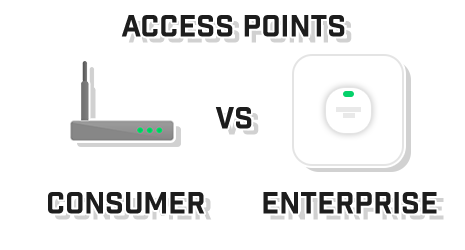
| Feature | Enterprise AP | Consumer Router |
|---|---|---|
| Client Capacity | Very High | Low to Medium |
| Management | Centralized | Local |
| Security | Enterprise‑grade | Basic |
| Scalability | High | Limited |
| Roaming | Seamless | Minimal |
| Performance | Multi‑Gigabit | Consumer speeds |
| Support | Vendor + Enterprise | Limited |
Enterprise APs are engineered for environments were performance and reliability matter most. For example, while a consumer router might serve 5–10 devices well, an enterprise AP can manage 50–100 clients or more without performance degradation.
Why Seamless Wi‑Fi Coverage Matters in 2026
The business case for strong wireless infrastructure
In 2026, connectivity is a core operational requirement rather than a convenience. Reliable Wi‑Fi enables:
Remote and hybrid workforces
Cloud‑native applications
Voice over Wi‑Fi (VoWiFi) and video conferencing
IoT and smart devices
BYOD policies
Real‑time data access and analytics
Enhanced customer experiences in public spaces
A poorly designed wireless network can lead to dropped calls, slow connections, lost productivity, security gaps, and frustrated users. Seamless coverage ensures that users stay connected as they move throughout a building, courtyard, campus, or facility.
Key Features to Look for in Enterprise Access Points (2026)
What separates good from great APs in modern deployments
To ensure your wireless infrastructure is future‑ready and capable of handling tomorrow’s demands, here are the features you must consider when selecting enterprise APs:
Multi‑Gigabit Radios
Modern APs now support multi‑gigabit speeds via 2.5G/5G Ethernet interfaces. This allows high‑speed to backhaul and prevents bottlenecks when many devices are connected simultaneously.
Wi‑Fi 6E / Wi‑Fi 7 Compatibility
The latest Wi‑Fi standards offer:
Wider channels
Lower latency
Higher throughput
Better interference handling
Wi‑Fi 6E introduces the 6GHz band, while Wi‑Fi 7 expands on that with multi‑link operation and even higher speeds — making them essential for enterprise environments.
Advanced Antenna Design
Enterprise APs use high‑gain, multi‑element antennas to maximize coverage and signal quality across open areas, corridors, offices, and dense device environments.
Intelligent Roaming
Seamless handoff between access points ensures that users don’t experience drops when moving — critical for VoWi‑Fi calls, live video sessions, and real‑time applications.
Quality of Service (QoS)
APs must prioritize traffic based on application type, such as:
Voice and video
Mission‑critical business apps
Data transfers
Guest access
QoS ensures that important traffic is never interrupted.
Integrated Security
Features such as:
WPA3 Enterprise
802.1X authentication
Rogue AP detection
Intrusion detection and prevention
MAC filtering
Guest portal controls
are essential for enterprise security.
Top Enterprise Access Points for 2026
Best models and solutions available today
In this section, we will explore the top enterprise access points that deliver outstanding performance, scalability, and features worth investing in for 2026 deployments.
Aruba (HPE) Instant Series
Aruba has long been a leader in enterprise Wi‑Fi. The Instant series offers strong Wi‑Fi 6/6E performance, advanced AI‑driven RF optimization, and seamless roaming.
Cisco Catalyst and Meraki APs
Cisco’s enterprise AP lineup spans traditional controller‑based (Catalyst) and cloud‑managed (Meraki) options, both offering robust security, high throughput, and excellent scalability.
Ubiquiti UniFi Pro / Enterprise
Ubiquiti’s UniFi series has become popular due to its balance of performance, user‑friendly management, and cost‑effectiveness — especially in education and SMB environments.
RUCKUS R Series
Known for its beamforming and adaptive antenna technology, RUCKUS APs provide excellent coverage in dense environments like stadiums, schools, and large offices.
Extreme Networks APs
Extreme Networks delivers enterprise access points with strong security, scalable cloud management, and high‑density performance.
Juniper Mist AI‑Driven APs
Juniper’s Mist platform uses AI and machine learning for automated optimization, predictive analytics, and improved user experience.
CTA — Enterprise Access Points Solution
Future‑proof your wireless network with enterprise AP solutions that deliver seamless connectivity, high capacity, and advanced security. Contact us to find the right AP lineup for your business needs.
Planning Your Enterprise Wi‑Fi Deployment
Strategic planning is key to seamless coverage.
A successful wireless network doesn’t happen by accident. Careful planning ensures that your enterprise APs provide full coverage, high throughput, and minimal interference. The steps include:
Conducting a Site Survey
Before deploying APs, perform a comprehensive site survey to understand:
Floor plans and physical layout
Wall materials and obstructions
Expected device density
Areas of high traffic (conference rooms, lobbies, classrooms)
Interference sources (microwaves, cordless phones, neighboring networks)
Modern site surveys use tools like Ekahau, AirMagnet, or NetSpot to simulate coverage and predict optimal AP placement.
Determining AP Quantity and Placement
Factors to consider:
Device density: More devices require more APs to avoid congestion.
Coverage overlaps: Ensure seamless roaming by overlapping AP coverage by 15–25%.
Channel planning: Reduce interference by alternating channels in adjacent APs.
Ceiling vs wall mounting: Depends on building layout and signal propagation.
Bandwidth and Backhaul Planning
High-density environments require multi-gigabit Ethernet backhaul. Consider:
2.5G or 5G Ethernet ports on APs
Link aggregation for redundancy and higher throughput
VLAN configuration to segregate traffic types (voice, data, guest, IoT)
Power Requirements
Enterprise APs often rely on Power over Ethernet (PoE). Check:
IEEE 802.3af vs 802.3at vs 802.3bt standards
PoE injector vs PoE switch support
Power budgeting across multiple APs
Security Considerations for Enterprise APs
Protecting the network starts at the access point.
Security must be built into your Wi‑Fi infrastructure. Key strategies include:
Authentication and Encryption
WPA3 Enterprise for strong encryption
802.1X authentication integrated with RADIUS or LDAP
Role-based access to segregate guest, employee, and IoT devices
Rogue AP Detection
APs should detect unauthorized or malicious wireless devices in the vicinity. Modern APs provide automatic rogue AP alerts and threat containment.
Intrusion Detection and Prevention
Enterprise APs often integrate IDS/IPS to prevent attacks such as:
Man-in-the-middle (MITM)
Evil twin attacks
Denial-of-Service (DoS)
Packet sniffing
Guest Network Isolation
A guest Wi‑Fi network ensures visitors do not access sensitive business resources. Features include:
Captive portals
Time-limited access
Bandwidth limiting
Separate VLAN or subnet
Monitoring and Managing Enterprise Wi‑Fi
Centralized management ensures reliability and performance.
Enterprise APs often connect to cloud management platforms or on-premises controllers for:
Real-time network monitoring
Device and client statistics
Automated firmware updates
Performance analytics
Troubleshooting and alerts
Advanced solutions also integrate AI/ML for:
Predictive analytics
Automatic channel optimization
Band steering to improve device performance
Cloud vs Controller-Based Management
Cloud-managed APs:
Easy deployment and scalability
Remote access and monitoring
AI-driven optimizations
Controller-based APs:
Centralized control on premises
Better for highly secure or regulated environments
Can support legacy devices
Analytics and Reporting
Enterprise APs collect data on:
Client connection quality
Latency and packet loss
Network congestion points
Application usage patterns
This helps IT teams make data-driven decisions, optimize coverage, and plan capacity for future growth.
Case Studies: Real-World Deployments
See how top organizations implement enterprise APs.
Corporate Office Campus
1500 employees
250 APs deployed with Wi‑Fi 6E
AI-assisted channel management
Outcome: Seamless roaming, 99.9% uptime, zero dropped VoWiFi calls
Hospital Network
Multiple floors with high-density devices
APs integrated with IoT patient monitoring devices
Separate VLANs for guest Wi‑Fi
Outcome: Reliable connectivity for mission-critical devices
University Campus
Mixed indoor/outdoor coverage
Adaptive RF optimization for high-density lecture halls
Outcome: Smooth video streaming and cloud access for thousands of students
Best Practices for Enterprise Wi‑Fi Deployment
Maximize coverage, performance, and security.
Conduct regular site surveys
Maintain proper channel planning and frequency allocation
Monitor client density and performance continuously
Segment networks for security and performance (voice, IoT, guests)
Use APs with automatic firmware updates and security patches
Integrate with network access control (NAC) for compliance
Prepare for future Wi‑Fi standards (Wi‑Fi 7, multi-link operation)
While exploring the Best Enterprise APs for Seamless Wi-Fi Coverage in 2026, it’s important to highlight how solutions like Cisco access points provide businesses with secure, scalable, and high-performance wireless networks designed for modern enterprise environments.